Welcome to FullStory!
To help you get acquainted and comfortable with making code changes at FullStory, we created this very simple codelab to let you see the mechanics of how code flows here.
Prerequisites
- A working FullStory dev setup, as described in this doc
- Knowledge of git basics
What You'll Learn
Some of the things you'll learn in this codelab:
- Git branch conventions at FullStory
- How to submit code for review
- Where to see build status of a PR in our CI system
We'll be editing two files, devs.go and slackname_githubid_slackid.csv that contain all of the Github and Slack usernames for people who commit code at FS.
Finding your Slack User ID
From either the Slack app or website where you are logged in:
- Click on your profile image
- Click the
Profilemenu item - Click the
...icon - Click
Copy Member ID
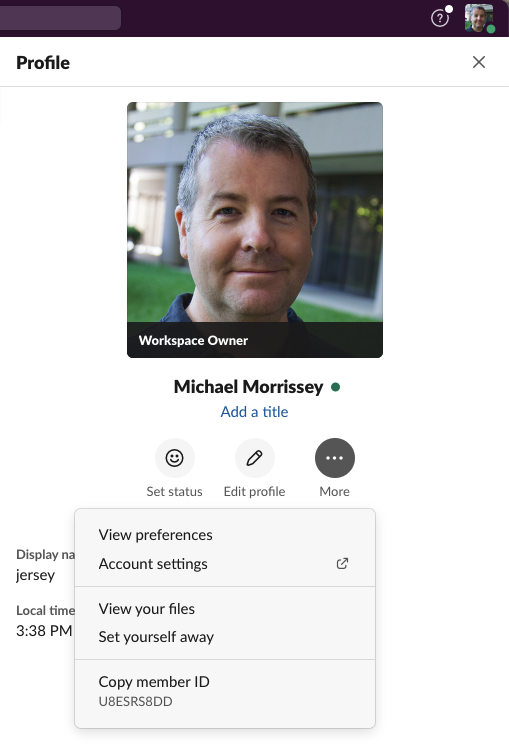
All commits at FullStory are done through pull requests ("PRs"). First, ensure that you are on the master branch and that your repo is up to date:
git checkout master
git pull
Now create your working branch. Our convention is that branches are prefixed with your FullStory gmail username (not your github username, if they're different). Create your working branch for this codelab:
git checkout -b <username>/codelab-first-pr
Modify your files
Edit the file projects/fullstory.go/src/fs/fsteam/devs.go under the FS_HOME directory and add a line to map your Github username to your FullStory Slack username, maintaining alphabetical order, and save it.
Next, edit the file projects/fullstory/tools/ci/slackname_githubid_slackid.csv and add a line with your info.
Commit and push your change
Review and commit your change locally with a friendly message:
git add --patch
git commit -m "I'm new here! First PR!"
Now push your change to Github:
git push --set-upstream origin <username>/codelab-first-pr
Visit the mn repo on Github; you should see a message like this:
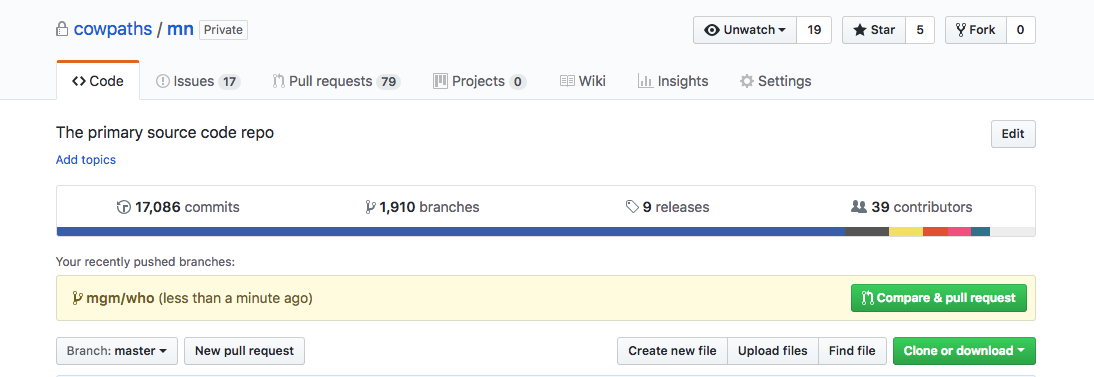
Click Compare & pull request. At FullStory, we use Assignees, not Reviewers, for pull requests. Pick someone from your team (perhaps your mentor), and set them as the assignee for the PR.
Wait for the person to review. It may be a while if that person is busy! Be patient. If your change looks good, your reviewers will respond with "LGTM" - "looks good to me", and will approve the change.
When the change is approved, it's your responsibility to merge it into master. Before it can be merged, though, your PR branch must successfully build on our CI system, CircleCI. You can see your build status by clicking on the Details link for one of the checks on your PR page, which looks something like the image below.
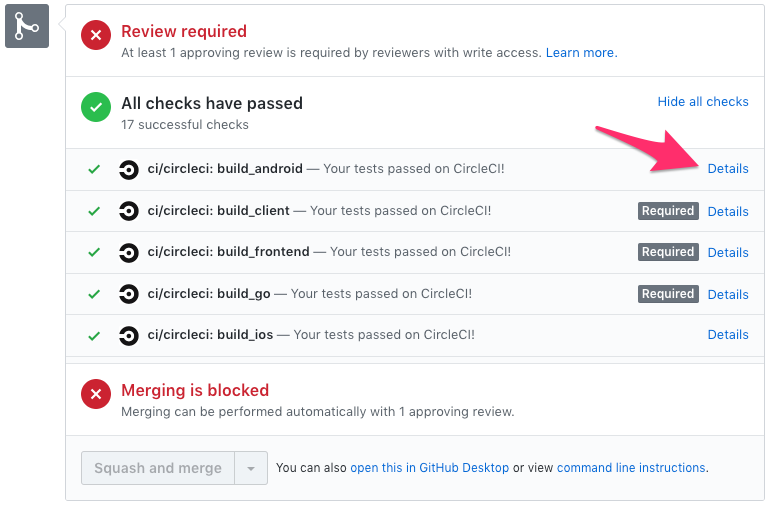
On the CircleCI page, you can see all jobs for your PR and their progress by clicking the "commit" link under Workflow at the top:

Once your PR builds cleanly and you've received approval from your reviewer, you can merge your change from the UI. If there is a merge conflict, github will let you know and prevent the merge, which you'll then have to resolve (outside the scope of this doc).
Deleting your branch
After you merge the change, github will delete the upstream branch. We don't want dead branches lying around. You should also clean it from your local repo:
git checkout master
git branch -D <username>/codelab-first-pr
At this point, your code will be in the master branch, which also gets built on every change.
Visit CircleCI again; you should see the tasks for your change build running near the top:
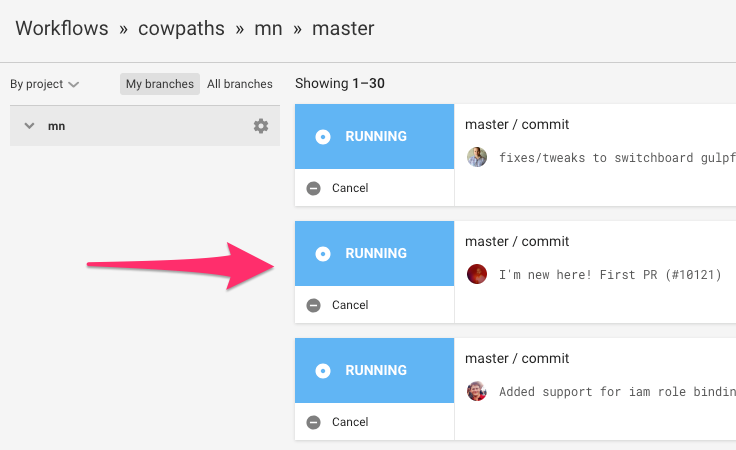
Now that you've walked through the mechanics of creating and submitting a trivial change, you're ready for something bigger! Talk to your TL or manager about a good starter project.